



Google launched its Nano Banana Pro model with improved text rendering and better character consistency last week. Just like its predecessor, Nano Banana Pro also went on top of various benchmarks and at this point may just be the best AI image generation and editing tool that one can use at the moment.
However, unlike Nano Banana, the new model has limited image generations for free users, and if you don't have a Google AI subscription (which, by the way, is currently free for Jio users), you would have to find alternatives. One such alternative could be Adobe Firefly and Photoshop.
Nano Banana Pro comes to Adobe Photoshop and Firefly:
Adobe has announced that it is bringing the new Nano Banana Pro model to both Firefly AI and its most popular photo-editing tool, Photoshop. Adobe says users will be able to upload up to six reference images and prompt Nano Banana Pro to merge and refine those elements into a cohesive image.
Meanwhile, on Firefly Boards, users will be able to leverage Nano Banana Pro for developing campaign concepts by uploading text, images and icons, and asking the AI model to visualise them in real-world contexts like billboards.
On Photoshop, Adobe is using Nano Banana Pro to power the Generative Fill feature — the AI-backed tool that allows users to add, remove or modify an image using a simple text prompt.
“With Firefly and partner models in Photoshop, creative professionals can move seamlessly from generative experimentation to refining results using layers, masks and selections for pixel-perfect editing, all without breaking their workflow,” Adobe said in a release.
Adobe does not list how many free edits one can make with Nano Banana Pro on Firefly, but I was able to edit at least three images using Google’s new AI model in Firefly. The good thing with Firefly is that you can also select the exact aspect ratio for your image like 16:9 or 3:4, both while editing and generating images, which gives it an edge over using Nano Banana Pro directly via Gemini.
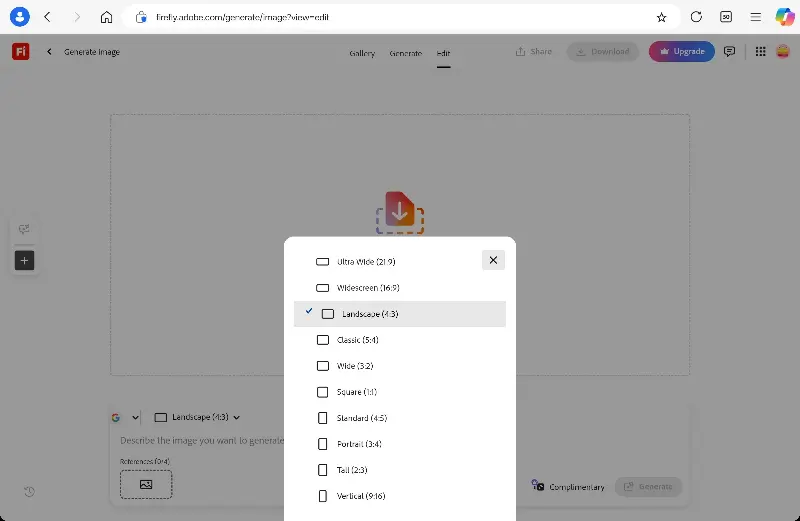
While Gemini usually follows the directions about aspect ratio correctly, there have been cases in the past where the chatbot failed to follow my instructions, and I had to navigate to another chatbot to fix the aspect ratio.
How to use Nano Banana Pro on Firefly?
- Open the Firefly website or app
- Select Generate Image for generating a fresh image or start in Prompt to Edit if you want to edit an existing image.
- Select Nano Banana Pro in the model selector
- Enter the text prompt to make the desired changes to you image or create a fresh one.